How to switch a game library from lending to browse-only
Turn off lending in a game library that already lends games: what happens to games that are out and how to finish once they're back.
12 steps with screenshots of the app
If the game library already lends games and you want it to become browse-only, you can turn off lending for all of them at once. Games that are out at that moment stay lendable until they come back, so no loan is left half-way. It works the same for a Meeplay's game library and for your club's: you open your club's from its dashboard, with the Library icon.
- Have the Meeplay app installed and be logged in to your account.
- Manage an organization on Meeplay. If you don't have one yet, follow the How to create your organization guide first.
- Have a published game library in a Meeplay. If you don't have one yet, follow How to add a game library to a Meeplay.
In each screenshot, what you need to tap is outlined in yellow and pointed out with an arrow.
- Step 1 of 12
Switch to your organization's profile
On the home screen, tap the two arrows button to the right of your name.
- Step 2 of 12
Choose your organization
Under Select an organizer, tap your organization's name.
- Step 3 of 12
Open the agenda
Tap the calendar on the bottom bar.
- Step 4 of 12
Open the Meeplay
In list view, tap the Meeplay that has the game library.
- Step 5 of 12
Open the game library
On the Meeplay page, tap Game library.
- Step 6 of 12
Open the catalog
The game library panel opens. Tap Catalog.
- Step 7 of 12
See what's out
Each game shows how many copies are free. Here one copy of Dixit is on loan: "1/2". Tap Select.
- Step 8 of 12
Select them all
Tap Select all.
- Step 9 of 12
Open bulk actions
Tap Bulk actions.
- Step 10 of 12
Turn off lending
Under Available for loan, tap Unmark and then Apply.
- Step 11 of 12
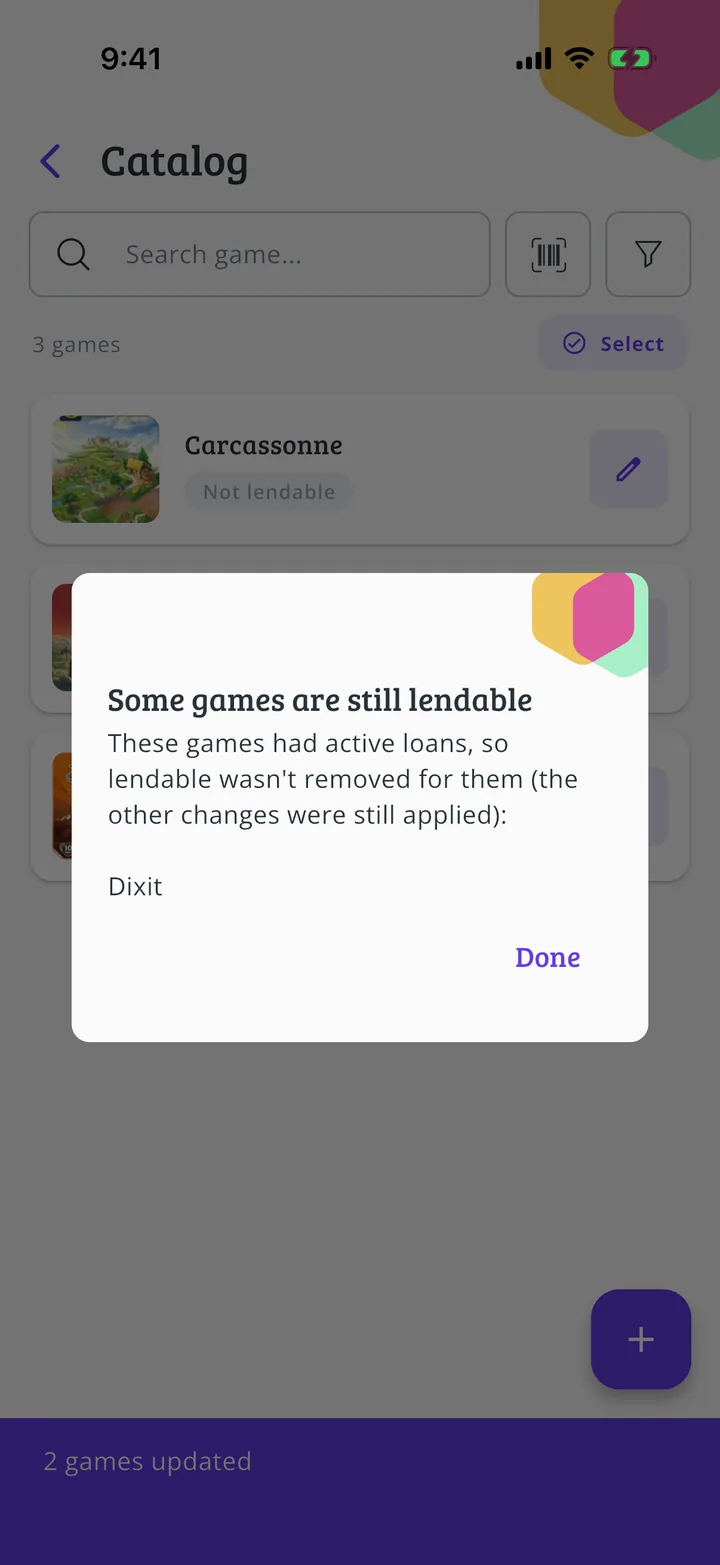
Games on loan wait
The app lists the games with ongoing loans: it doesn't turn off lending for those, so they can be returned as usual. The rest have already changed. Tap Done.
- Step 12 of 12
Finish once they're back
The other games show Not lendable; Dixit is still on loan. Once it's returned (How to record a game return), repeat these steps and the whole library will be browse-only.
All done!
You have finished the guide. If something did not go as in the screenshots, tell us which step you got stuck on and we will help you.