How to share a Meeplay you created
Invite people to your Meeplay through WhatsApp, social media or on paper: with a flyer that carries its QR code, just the QR code or the invitation link.
5 steps with screenshots of the app
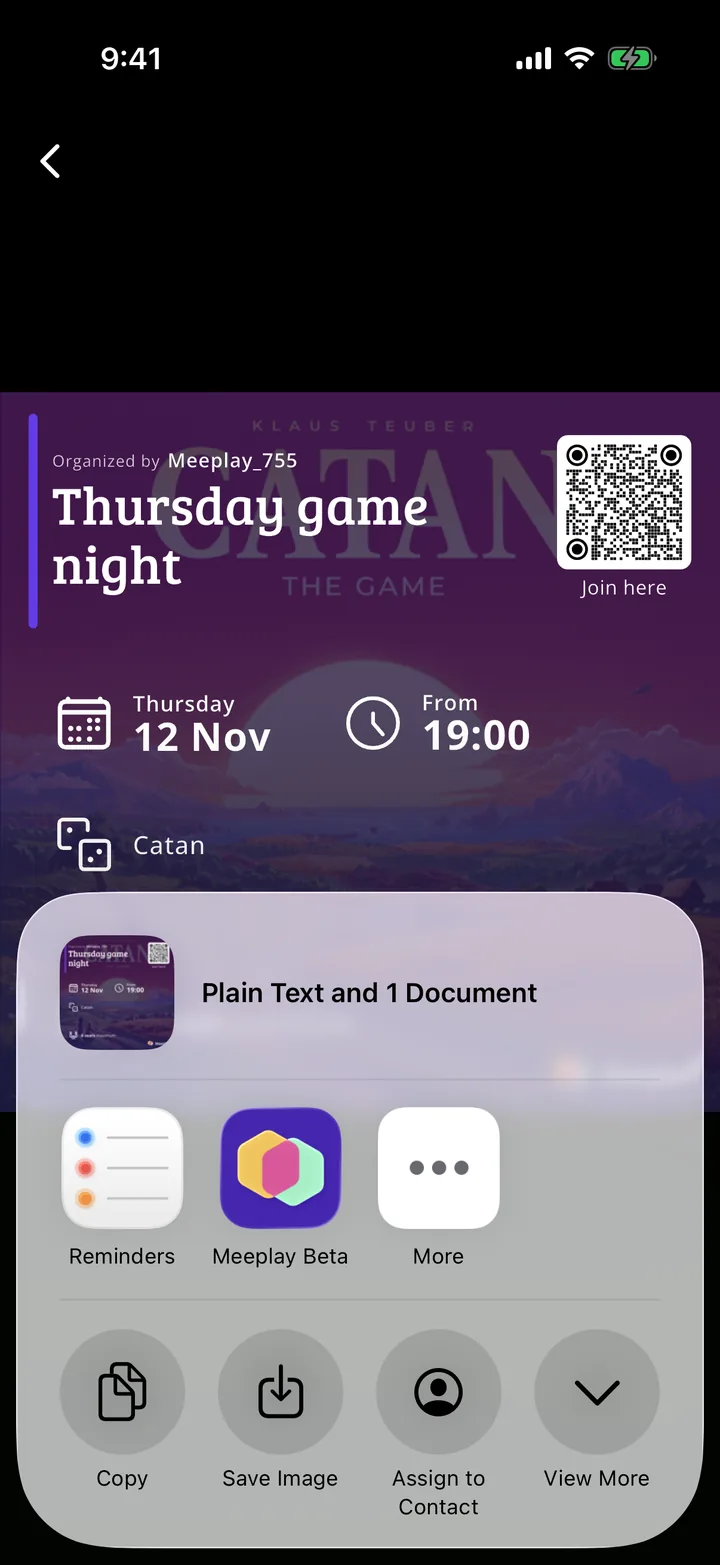
To get more people to join, share your Meeplay outside the app. The flyer brings together the name, date, time, games and a QR code to join; you can also share just the QR code or copy the invitation link.
- Have the Meeplay app installed and be logged in to your account.
- Have a Meeplay created. If you don't have one yet, follow the How to create your first Meeplay guide first.
In each screenshot, what you need to tap is outlined in yellow and pointed out with an arrow.
- Step 1 of 5
Open your Meeplay
On the home screen, under Mis eventos, tap your Meeplay.
- Step 2 of 5
Open the menu
Tap the three dots button at the top right.
- Step 3 of 5
Tap "Share"
Tap Share.
- Step 4 of 5
Choose how to share it
You have four options: Share my activities QR, Share QR Code, Share flyer and Copy invitation link, to paste it wherever you like. Tap Share flyer.
- Step 5 of 5
Send it or save it
The app prepares the flyer with the Join here QR code and opens your phone's share menu: choose the app (WhatsApp, Instagram, email…) or save the image to print it.
All done!
You have finished the guide. If something did not go as in the screenshots, tell us which step you got stuck on and we will help you.
Next in «Create your event»How to set registration requirements for a Meeplay →