How to save a Meeplay as a draft
Save a Meeplay halfway through and publish it when it is ready: until then only you can see it.
6 steps with screenshots of the app
You don't have to have everything decided. Save the Meeplay as a draft, finish preparing it at your own pace and publish it later.
- Have the Meeplay app installed and be logged in to your account.
In each screenshot, what you need to tap is outlined in yellow and pointed out with an arrow.
- Step 1 of 6
Open the create menu
On the home screen, tap the + button in the middle of the bottom bar.
- Step 2 of 6
Choose "New Meeplay"
Tap the New Meeplay icon.
- Step 3 of 6
Fill in what you have
Enter at least the name and tap Save draft.
- Step 4 of 6
Confirm
This Meeplay will only be visible to you until you publish it. Tap Save.
- Step 5 of 6
It is saved
Tap Done.
- Step 6 of 6
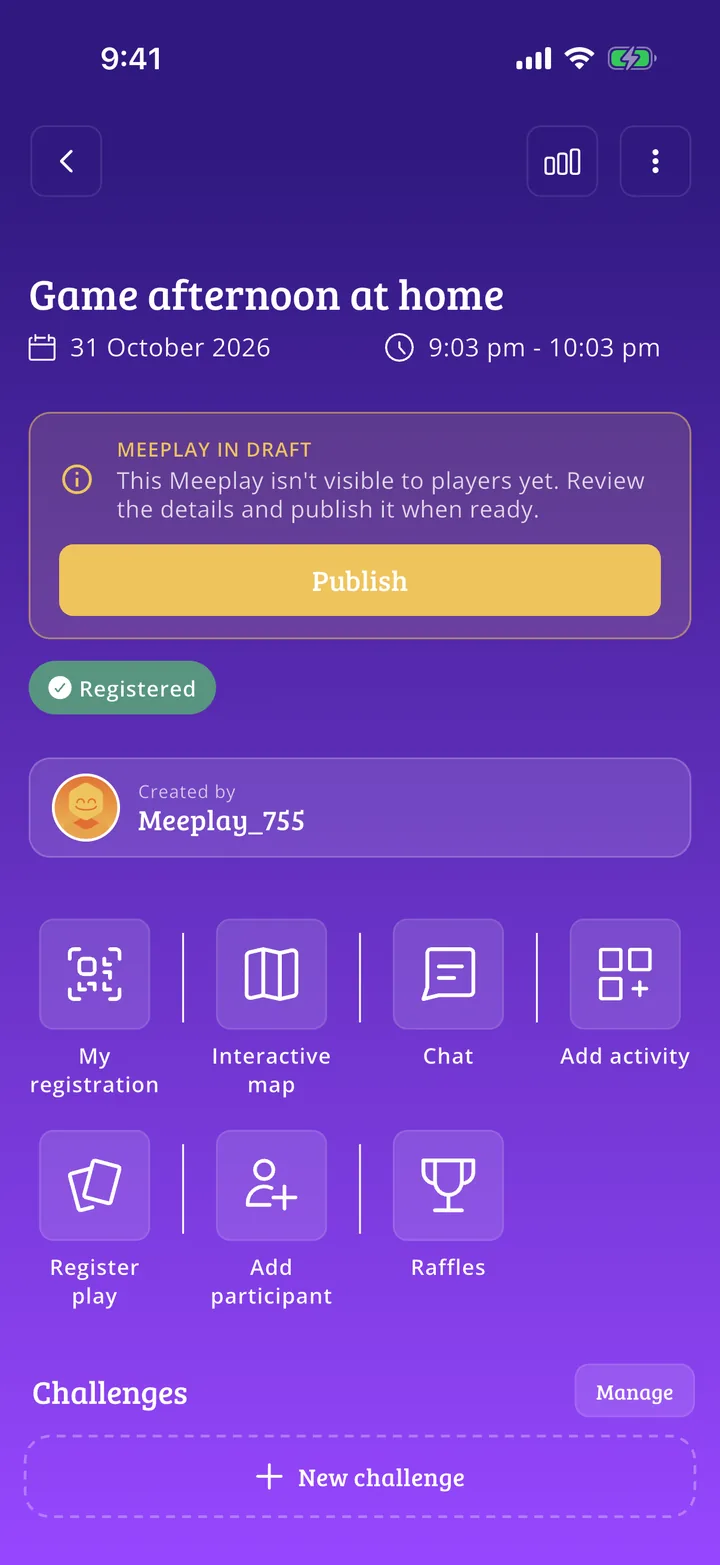
Publish it whenever you like
The Meeplay in draft notice reminds you that nobody else can see it yet. Edit it at your own pace and, when it is ready, tap Publish.
All done!
You have finished the guide. If something did not go as in the screenshots, tell us which step you got stuck on and we will help you.
Next in «Create your event»Privacy and admission: how to control who joins your Meeplay →