How attendees see the map
Open the Meeplay's map, tap an area to see what's there and find exhibitors by name or in the list.
6 steps with screenshots of the app
If a Meeplay has an interactive map, you can use it to find your way around the event: tap each area, see the list of exhibitors and search for them by name.
- Have the Meeplay app installed and be logged in to your account.
- The Meeplay must have a map. If you are the organizer, follow How to set up your Meeplay's interactive map.
In each screenshot, what you need to tap is outlined in yellow and pointed out with an arrow.
- Step 1 of 6
Open the map
On the Meeplay page, tap Interactive map. It only appears if the Meeplay has a map. The buttons you see depend on your role in the Meeplay.
- Step 2 of 6
Tap an area
This is the venue's map. Tap an area to see what's there.
- Step 3 of 6
See what's there
The map zooms in on the area and you see its name and type at the bottom. To see everything at the event, tap the list button at the top right.
- Step 4 of 6
Choose from the list
Exhibitors lists all the areas. Tap one to go to it on the map.
- Step 5 of 6
It takes you there
The map moves to that area. To search by name, tap the magnifying glass at the top right.
- Step 6 of 6
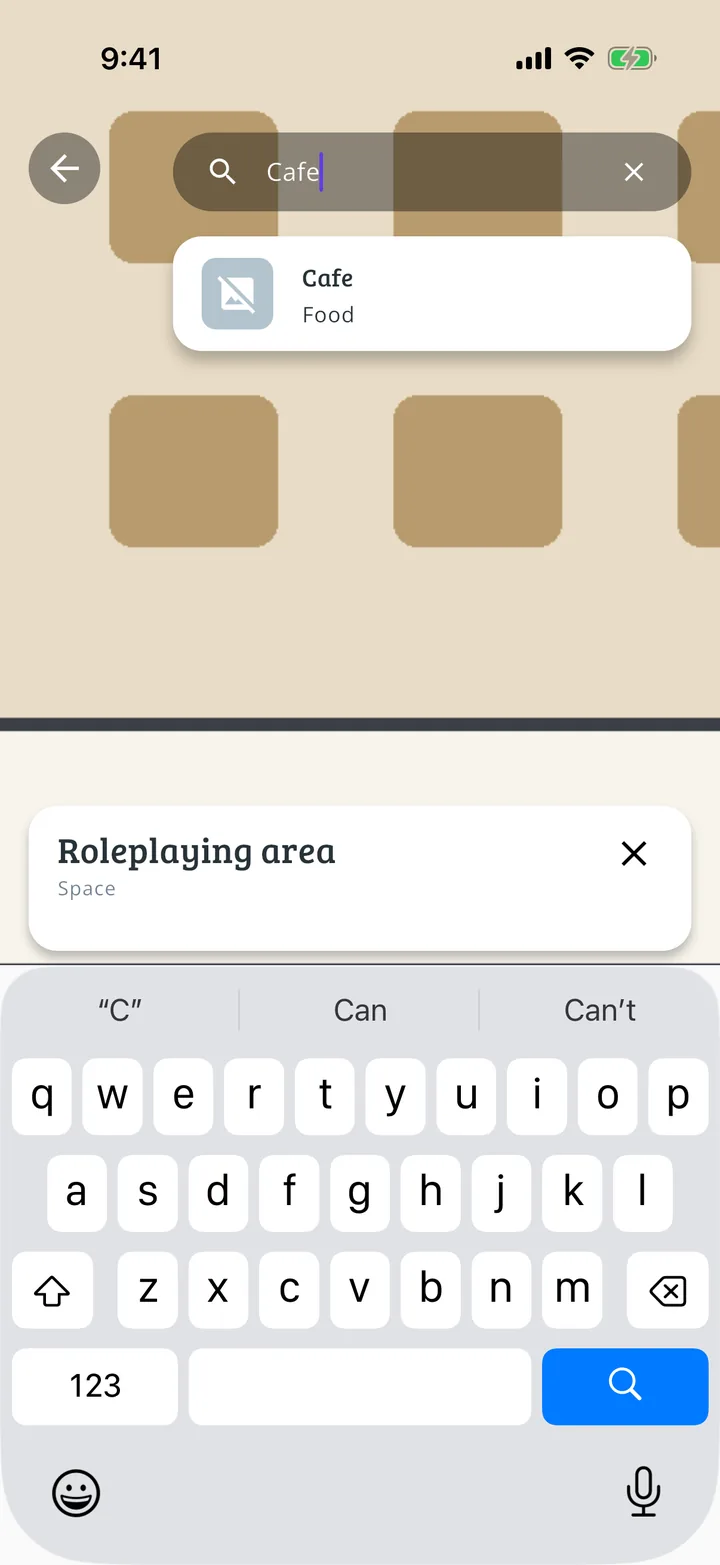
Search by name
Type what you're looking for and tap the result to go to that area.
All done!
You have finished the guide. If something did not go as in the screenshots, tell us which step you got stuck on and we will help you.
Next in «For players»How to see a Meeplay's game library →