How to check the status of your games at the flea market
See which of your games are at the flea market, which have sold and how much money you're due.
5 steps with screenshots of the app
While the flea market is on, you can follow in the app what has happened to each of your games and how much you've earned so far.
- Have the Meeplay app installed and be logged in to your account.
- Have a stall with games handed in. See How to sign up for the flea market and register your games.
In each screenshot, what you need to tap is outlined in yellow and pointed out with an arrow.
- Step 1 of 5
Open the flea market
On the Meeplay page, tap Flea market. It only appears if the Meeplay has a visible flea market.
- Step 2 of 5
Go to your stall
Tap My stand.
- Step 3 of 5
Your stall
Here you have your code, how many items you have and what you're due. Tap My items.
- Step 4 of 5
See your items
The summary is at the top: registered, in the hall and sold. Each item shows its status, and you can filter them with the tabs.
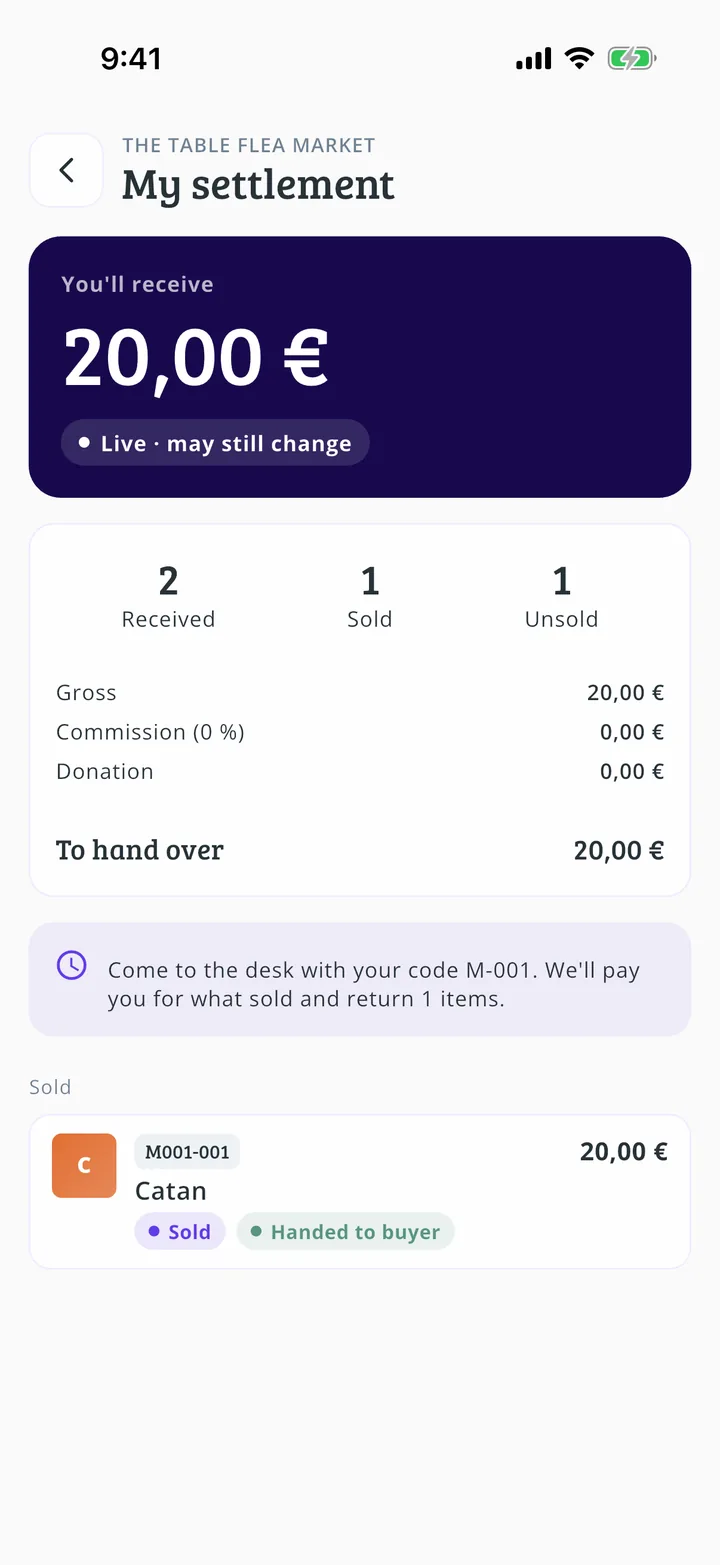
- Step 5 of 5
See what you're due
Go back and tap My settlement. You'll see what's sold, the commission and what you're due. Until the organizers close the accounts, the figures are live and can still change.
All done!
You have finished the guide. If something did not go as in the screenshots, tell us which step you got stuck on and we will help you.