If a Meeplay has a flea market, you can sell your games there: the organizers receive them at the desk and take care of selling them. First you request a stall and, once it's approved, you register your games.
Have the Meeplay app installed and be logged in to your account.
In each screenshot, what you need to tap is outlined in yellow and pointed out with an arrow.
Step 1 of 8
Open the flea market
On the Meeplay page, tap Flea market. It only appears if the Meeplay has a visible flea market.
Step 2 of 8
Go in as a seller
Tap Sign up as a seller. View catalog shows what's on sale.
Step 3 of 8
Check the terms
Here are the terms, such as the commission, and the rules. Tap Apply for a stand.
Step 4 of 8
Accept the rules
Read the rules, add a comment if you like and tick I have read and accept the rules. Tap Submit application.
Step 5 of 8
Wait for approval
Your request stays pending until the organizers review it. If you change your mind, tap Cancel application.
Step 6 of 8
You have a stall
Once you're approved, you'll see your Your seller code. Say it at the desk when you drop off your games. Tap My items and then Add item.
Step 7 of 8
Register your game
Choose the type and condition, and enter the title and price. Tap Submit.
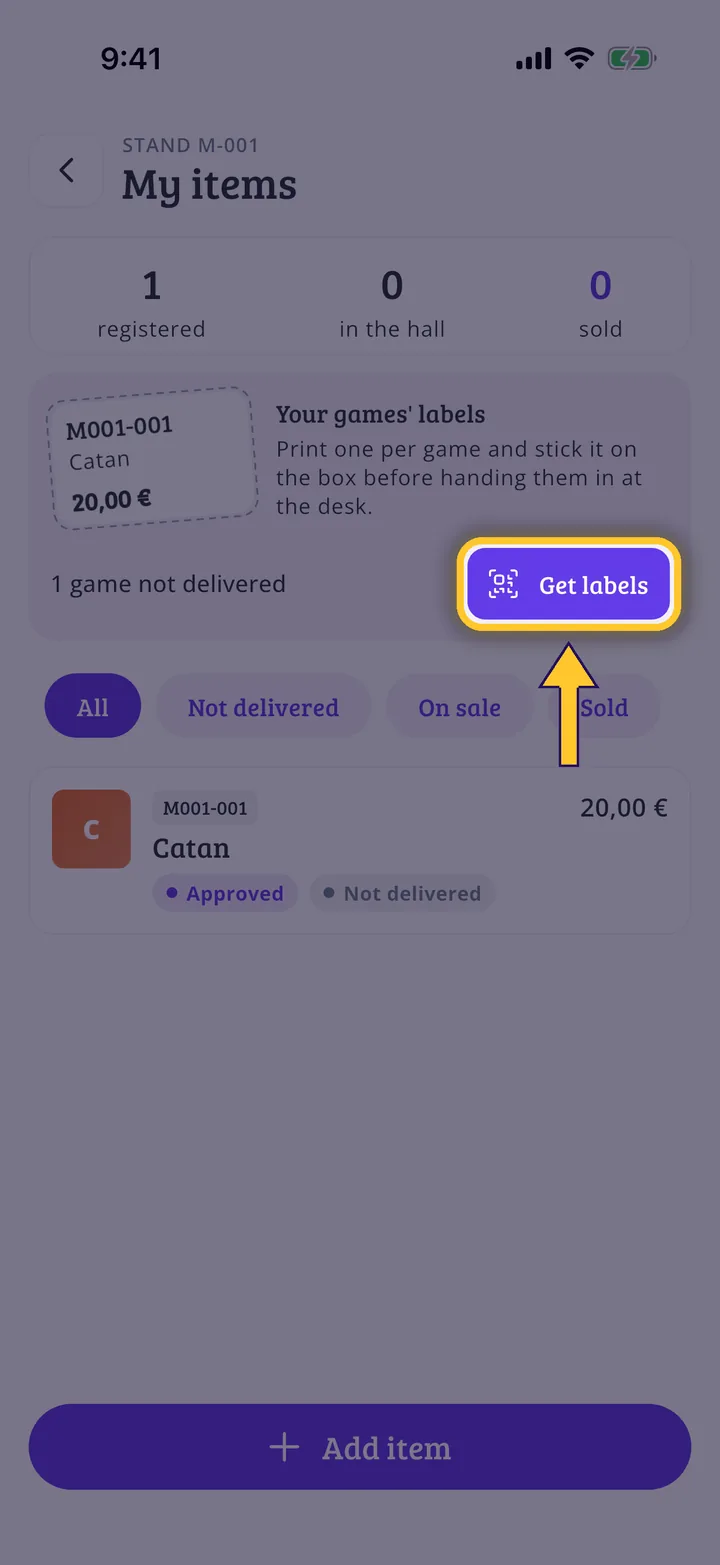
Step 8 of 8
Get the labels
Your game now has its code. Add the others, tap Get labels and print them. Stick each one on its box and hand them in at the desk. To follow what happens to them, see How to check the status of your games at the flea market.
Guide completed
All done!
You have finished the guide. If something did not go as in the screenshots, tell us which step you got stuck on and we will help you.