You can raffle prizes among the people at your event: they sign up by scanning a QR code and, whenever you like, the app draws the winners. This guide creates a raffle with one prize.
Have the Meeplay app installed and be logged in to your account.
In each screenshot, what you need to tap is outlined in yellow and pointed out with an arrow.
Step 1 of 9
Switch to your organization's profile
On the home screen, tap the two arrows button to the right of your name.
Step 2 of 9
Choose your organization
Under Select an organizer, tap your organization's name.
Step 3 of 9
Open the agenda
Tap the calendar on the bottom bar.
Step 4 of 9
Open the Meeplay
In list view, tap the Meeplay where you want to hold the raffle.
Step 5 of 9
Tap "Raffles"
On the page, tap the trophy icon: Raffles.
Step 6 of 9
Give it a title
Type the Title. If you like, add a description, registration requirements and a sign-up deadline.
Step 7 of 9
Add the prizes
Further down you choose the Access mode: Open or With code. You can add a question. Under Prizes type each prize's name and how many winners it has; Add another prize adds more. Tap Create raffle.
Step 8 of 9
Open the raffle
The raffle appears on the list. Tap it.
Step 9 of 9
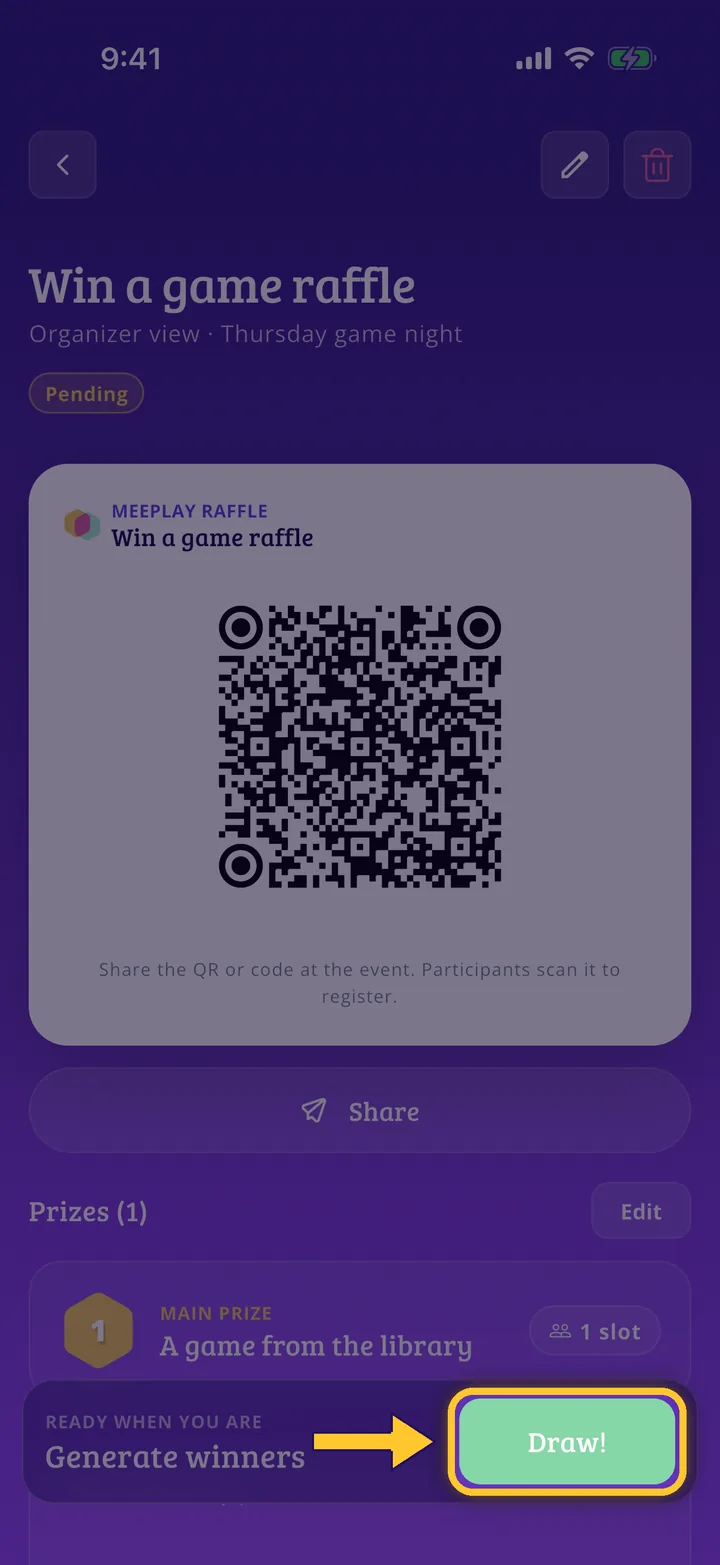
Share the QR code and draw
Show or share the QR code so people can sign up. When the time comes, tap the green button to draw the winners.
Guide completed
All done!
You have finished the guide. If something did not go as in the screenshots, tell us which step you got stuck on and we will help you.