How to link Stripe to get paid in the app
To charge registrations inside the app, link your organization's Stripe account.
7 steps with screenshots of the app
Payments inside the app are processed by Stripe. You only need to link your account once, when creating a paid tier.
- Have the Meeplay app installed and be logged in to your account.
- Manage an organization on Meeplay. If you don't have one yet, follow the How to create your organization guide first.
- Have the links to your cancellation policy and terms and conditions ready: they are required as soon as you ask for any detail.
In each screenshot, what you need to tap is outlined in yellow and pointed out with an arrow.
- Step 1 of 7
Switch to your organization's profile
On the home screen, tap the two arrows button to the right of your name.
- Step 2 of 7
Choose your organization
Under Select an organizer, tap your organization's name.
- Step 3 of 7
Open "New Meeplay"
Tap the + button at the bottom and then the New Meeplay icon.
- Step 4 of 7
Open the requirements
On the Meeplay form, tap Registration requirements.
- Step 5 of 7
Add a tier
Scroll down to Registration tiers & price and tap Add tier.
- Step 6 of 7
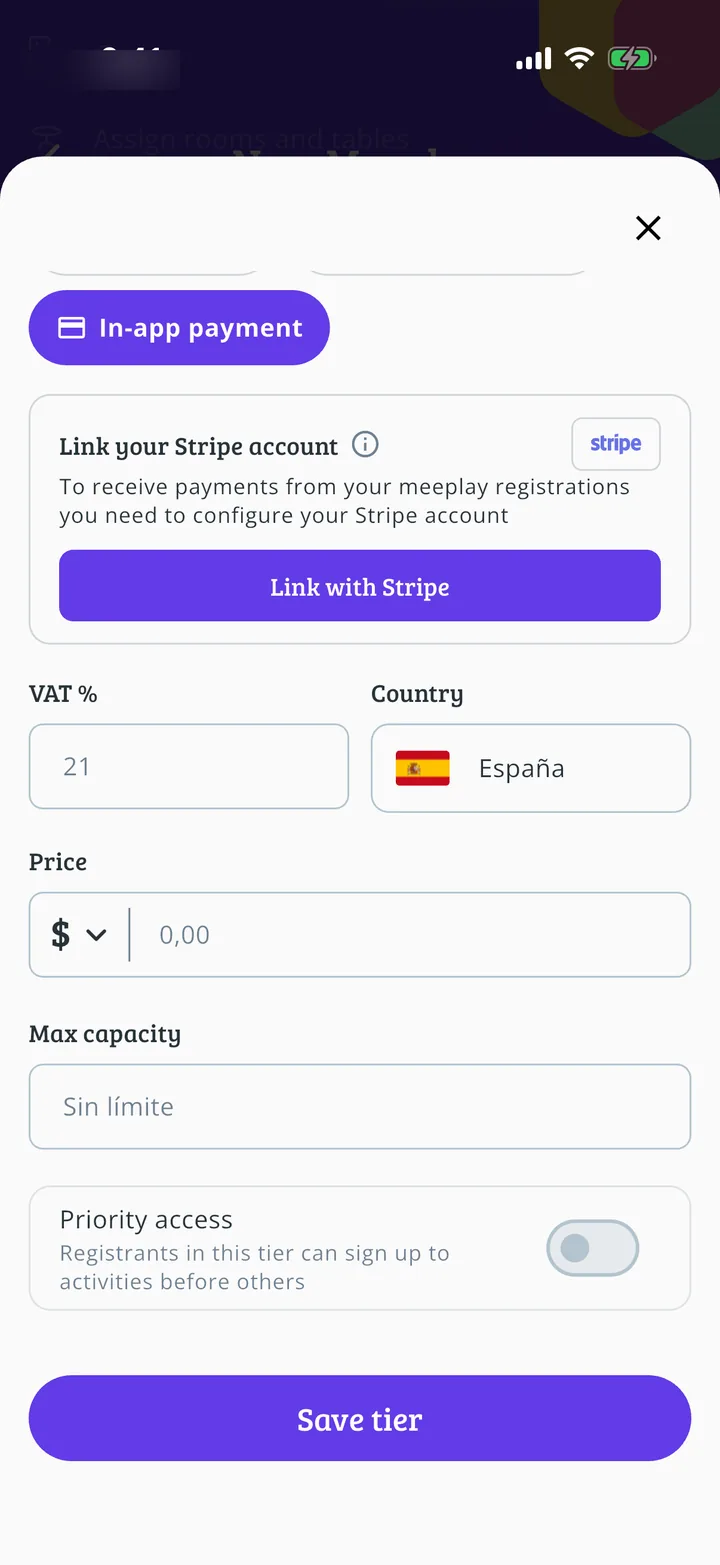
Choose in-app payment
Fill in the tier and, under Payment mode, tap In-app payment.
- Step 7 of 7
Link your account
Tap Link with Stripe. Stripe will open so you can complete your details; when you finish, go back to Meeplay and save the tier.
All done!
You have finished the guide. If something did not go as in the screenshots, tell us which step you got stuck on and we will help you.
Next in «Create your event»How to make a Meeplay with external registration →