A published Meeplay can be changed at any time from its page: the same form you created it with opens up. This guide raises a game night's seats from 6 to 8.
Have the Meeplay app installed and be logged in to your account.
Have created the Meeplay or be able to manage it. If you don't have one yet, follow the How to create your first Meeplay guide first.
In each screenshot, what you need to tap is outlined in yellow and pointed out with an arrow.
Step 1 of 8
Open your Meeplay
On the home screen, under Mis eventos, tap your Meeplay.
Step 2 of 8
Open the menu
Tap the three dots button at the top right.
Step 3 of 8
Choose "Edit Meeplay"
Tap Edit Meeplay.
Step 4 of 8
Go into editing
The management options open: you can also duplicate, finish or delete it. Tap Edit Meeplay.
Step 5 of 8
Change what you need
It is the same form you created it with: tap any detail to change it. In the example, tap the seats.
Step 6 of 8
Adjust the value
Change the number with the − and + buttons and tap Accept.
Step 7 of 8
Save the changes
When you are done, tap Save.
Step 8 of 8
Changes saved
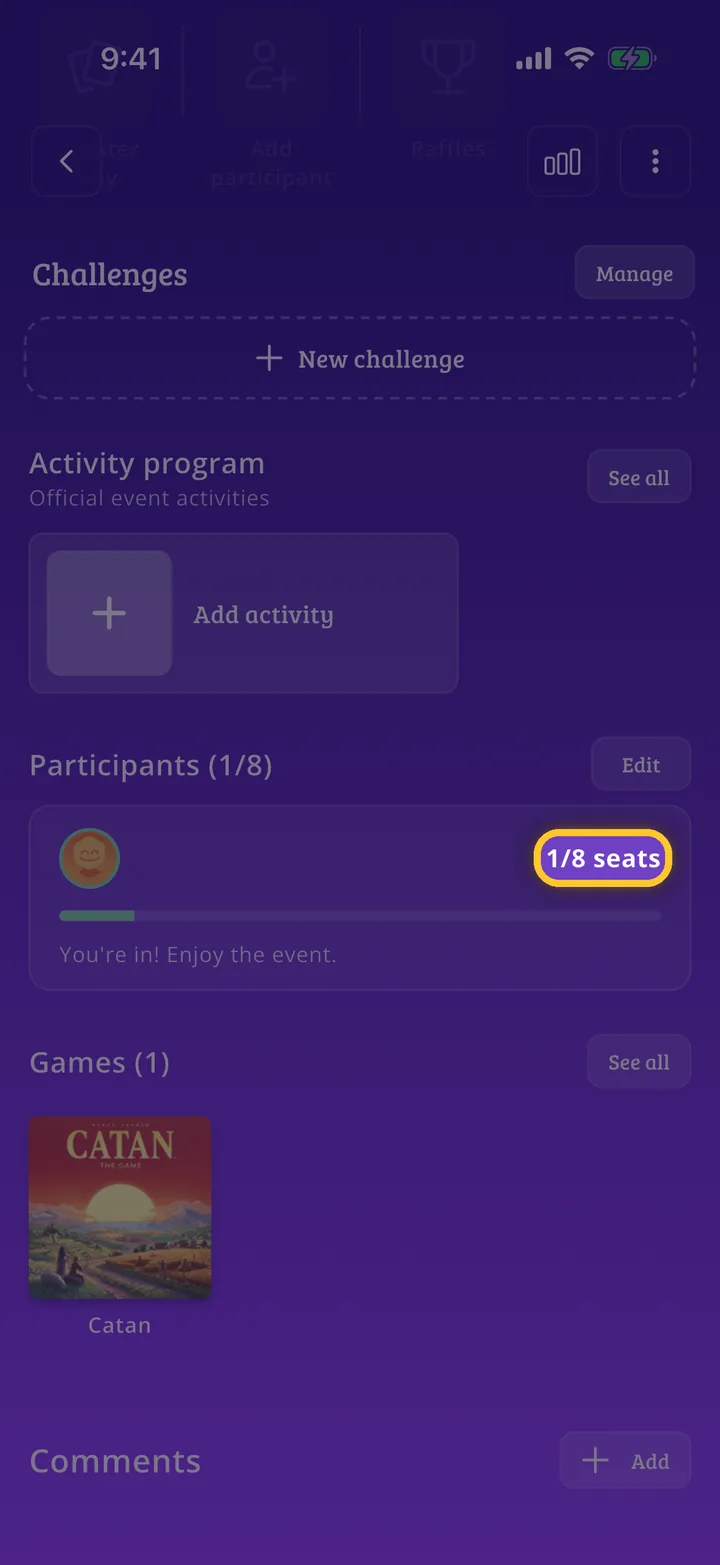
You are back on the Meeplay page with the changes applied: here, the new seats under Participants.
Guide completed
All done!
You have finished the guide. If something did not go as in the screenshots, tell us which step you got stuck on and we will help you.