How to create your Meeplay account
Sign up in the Meeplay app with your email and a password, and verify your address to start using it.
5 steps with screenshots of the app
All you need is an email address and a password. After you sign up you get an email to verify your account, and then you can log in to the app.
- Have the Meeplay app installed.
- Have your inbox at hand, to verify the account.
In each screenshot, what you need to tap is outlined in yellow and pointed out with an arrow.
- Step 1 of 5
Open sign-up
When you open the app, you see the login screen. At the bottom, next to Don't have an account?, tap Sign up.
- Step 2 of 5
Enter your details
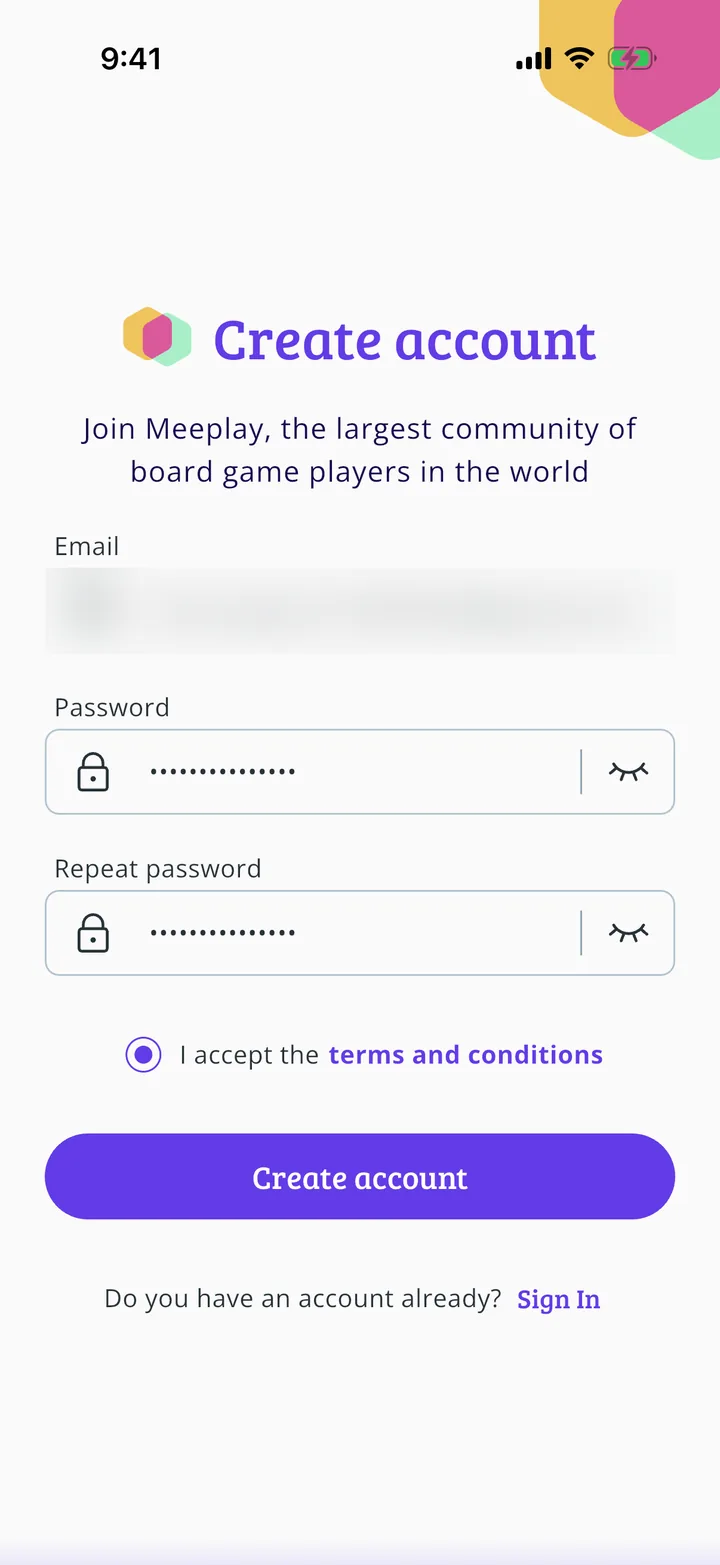
Enter your email and a password of at least 8 characters. Type it again in Repeat password.
- Step 3 of 5
Accept the terms
Tick the box for I accept the terms and conditions; you can tap them to read them. Then tap Create account.
- Step 4 of 5
Verify your email
The app tells you it has sent you an email. Open it and tap the link to verify your account. If you can't see it, check your spam folder.
- Step 5 of 5
Log in
Once the account is verified, go back to the app, enter your email and password and tap Sign In. You are in: carry on with How to edit your profile.
All done!
You have finished the guide. If something did not go as in the screenshots, tell us which step you got stuck on and we will help you.
Next in «For players»How to edit your profile →