How to edit your profile
Change your name, username, bio, photo and location in the Meeplay app, and let people know you are looking for people to play with.
6 steps with screenshots of the app
Your profile is what other players see. From here you change your details and bio, and decide whether to say you are looking for people to play with.
- Have the Meeplay app installed and be logged in to your account.
In each screenshot, what you need to tap is outlined in yellow and pointed out with an arrow.
- Step 1 of 6
Open your profile
On the home screen, tap your name at the top left.
- Step 2 of 6
Go to "Settings"
Tap Settings.
- Step 3 of 6
Open "Manage profile"
Tap Manage profile.
- Step 4 of 6
Choose "Edit profile"
Tap Edit profile.
- Step 5 of 6
Change your details
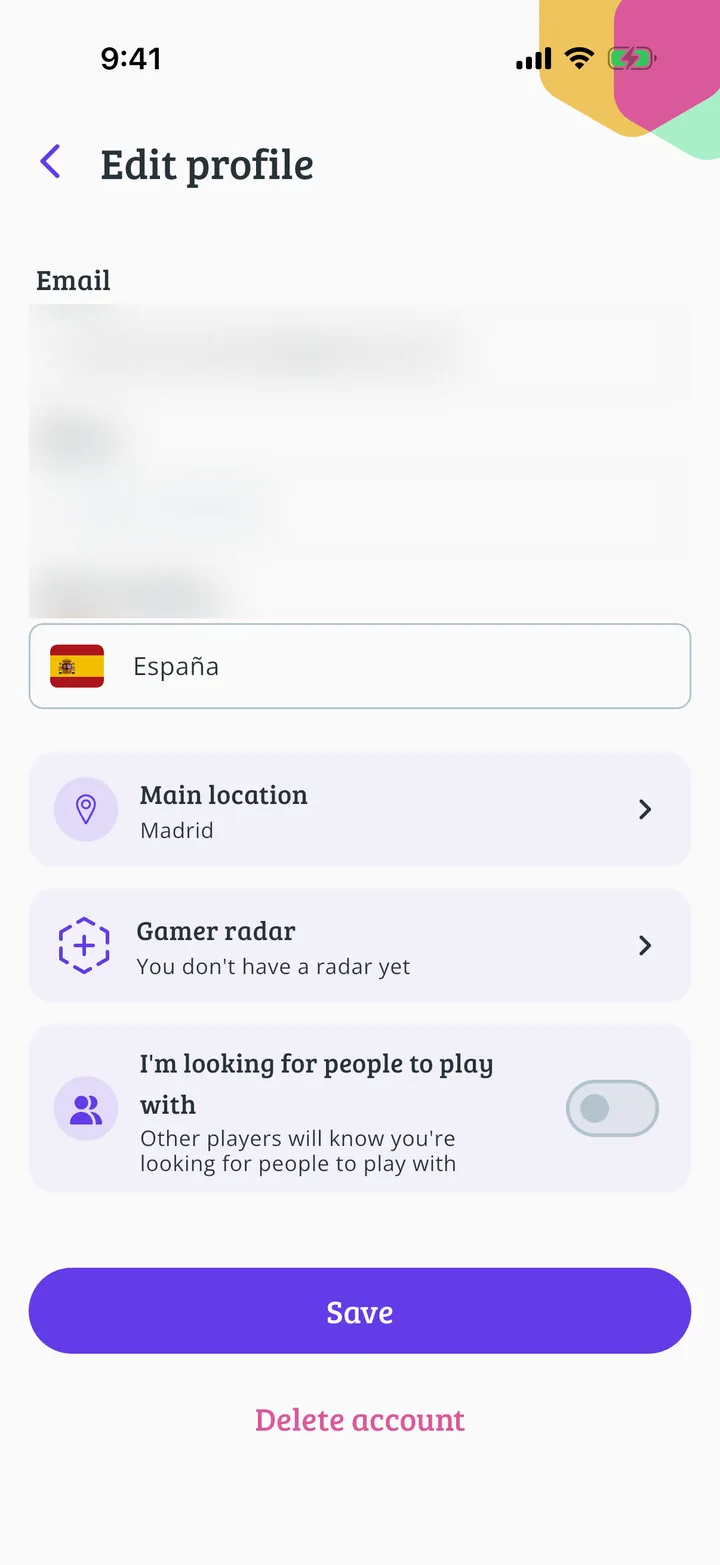
Tap any detail to change it. Your photo is at the very top. Under Bio say what kind of player you are.
- Step 6 of 6
Save the changes
Further down you have your country, main location, gamer radar and the option to say you are looking for people to play with. When you are done, tap Save.
All done!
You have finished the guide. If something did not go as in the screenshots, tell us which step you got stuck on and we will help you.
Next in «For players»How to add games to your collection →