How to compare yourself with another player
See how many games you have played with someone, how many you have won and which games, from your stats.
5 steps with screenshots of the app
Your stats can be narrowed to the games you have played with a specific person: that way you see how many you have played together, how many you have won and in which games.
- Have the Meeplay app installed and be logged in to your account.
- Have logged games with that person: see How to log a game.
In each screenshot, what you need to tap is outlined in yellow and pointed out with an arrow.
- Step 1 of 5
Open your stats
Tap the bars button on the bottom bar.
- Step 2 of 5
Tap "Compare with player"
Choose the period first, if you like, and tap Compare with player.
- Step 3 of 5
Choose the person
The people you have played with most come first; you can also search. Tap the person.
- Step 4 of 5
Your games together
Now every figure counts only the games with that person: how many you have played, how many you have won and your most played game. To go back to your usual stats, tap the X next to their name.
- Step 5 of 5
Game by game
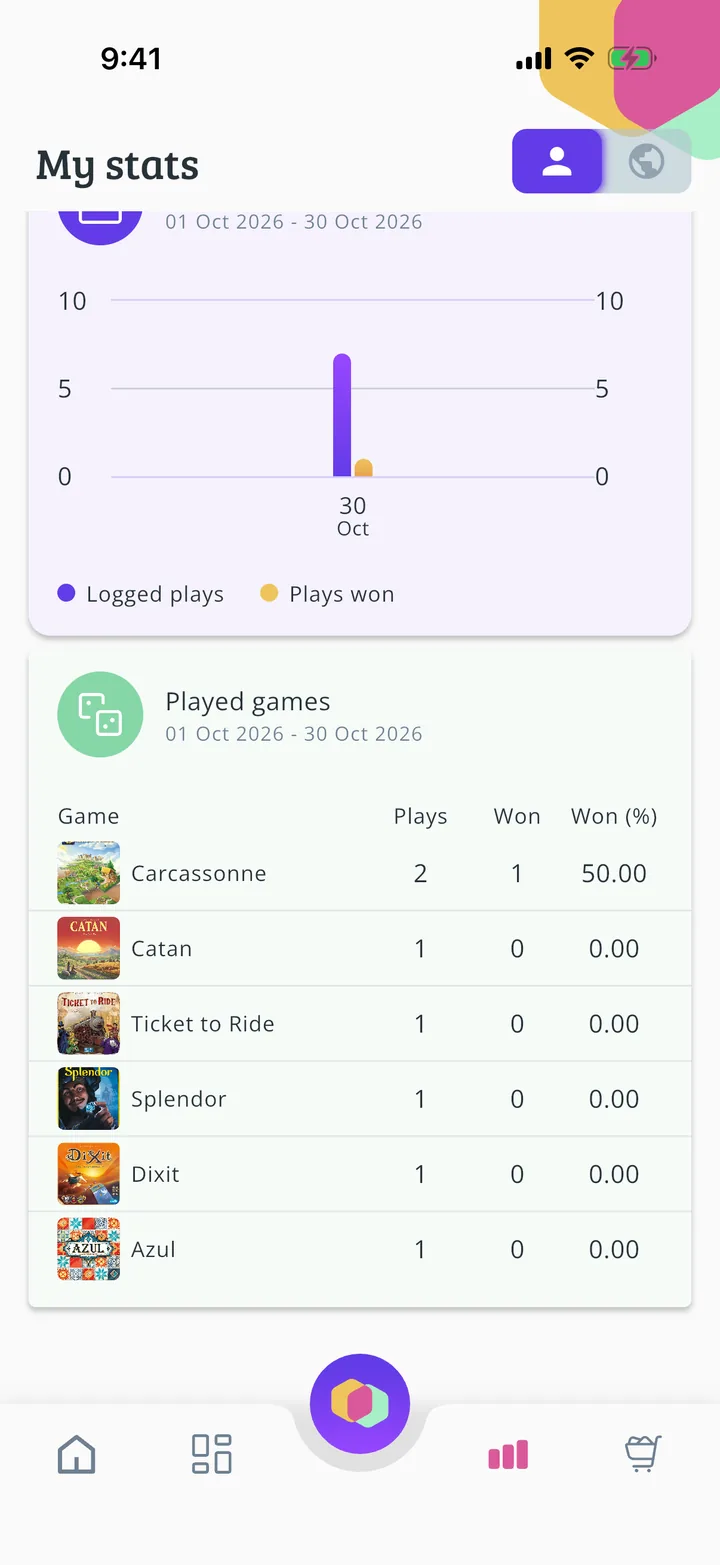
Further down, the games table: how many games you have played of each one and how many you have won.
All done!
You have finished the guide. If something did not go as in the screenshots, tell us which step you got stuck on and we will help you.