Where to find your game collection
Find the list of games you own in the app, filter and sort it, and import someone else's or your BGG one.
3 steps with screenshots of the app
Your collection is on your profile: there you see the games you own and, from the full list, you can filter them, sort them or bring in the ones from another account or from BGG.
- Have the Meeplay app installed and be logged in to your account.
- For games to show up, you need to have added them: see How to add games to your collection.
In each screenshot, what you need to tap is outlined in yellow and pointed out with an arrow.
- Step 1 of 3
Open your profile
On the home screen, tap your name at the top left.
- Step 2 of 3
Your collection on your profile
Scroll down to Game collection: the games you own show up there. To see them all, tap Show all.
- Step 3 of 3
The full list
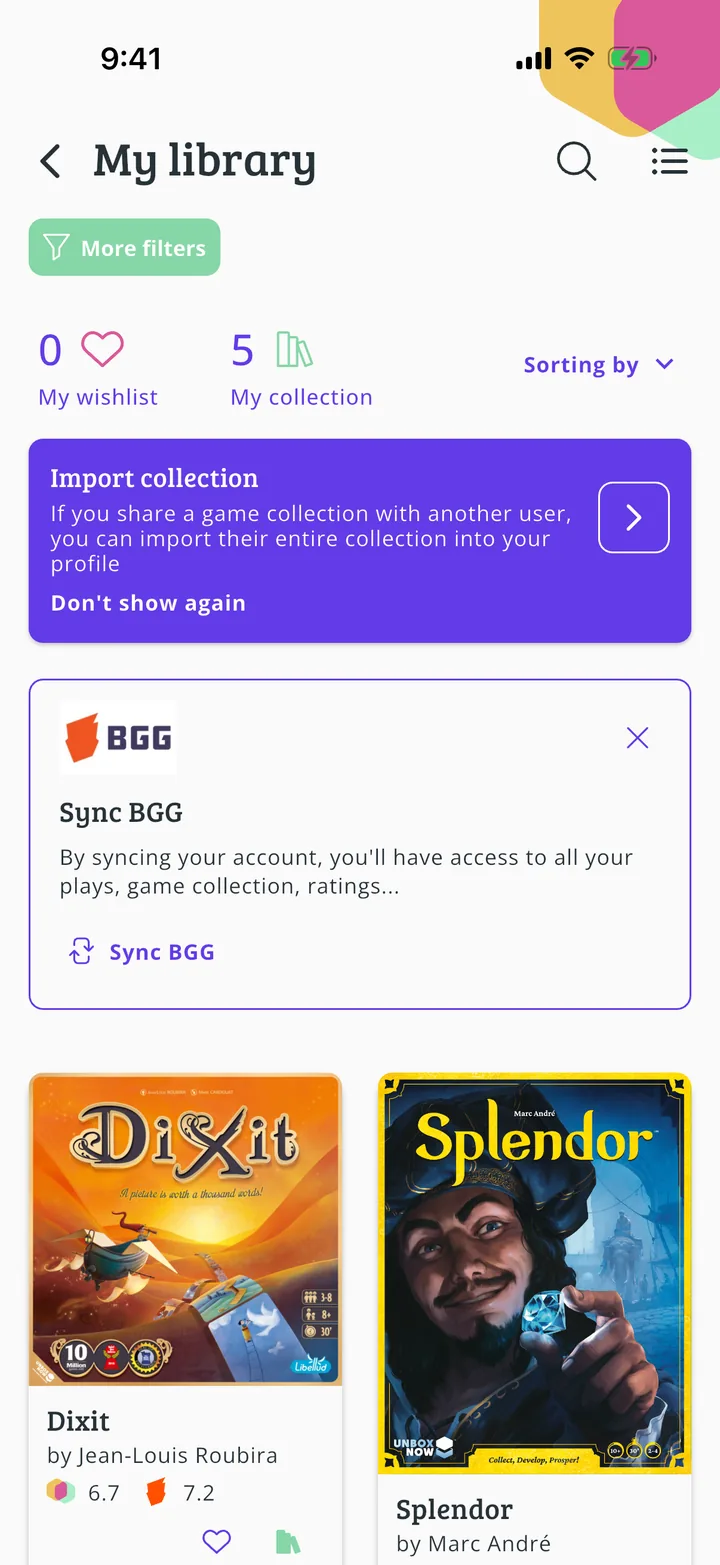
At the top you choose between My collection and My wishlist, and with More filters and Sorting by you filter and sort it. Import collection brings in the collection of someone you share games with, and Sync BGG brings in your BGG account's one.
All done!
You have finished the guide. If something did not go as in the screenshots, tell us which step you got stuck on and we will help you.
Next in «For players»How to sync your account with BoardGameGeek →