Help · Joining events
How to vote in awards
Open a Meeplay's vote, choose your favourite game in each category and send your vote.
Before you start
6 steps with screenshots of the app
If a Meeplay has awards, you will see a notice on its page while voting is open. You can change your vote until it closes.
- Have the Meeplay app installed and be logged in to your account.
In each screenshot, what you need to tap is outlined in yellow and pointed out with an arrow.
- Step 1 of 6
Open the Meeplay
On the home screen, under Mis eventos, tap the Meeplay.
- Step 2 of 6
Open the vote
Tap the awards notice.
- Step 3 of 6
Choose a category
At the top you can see the time left. Tap the category.
- Step 4 of 6
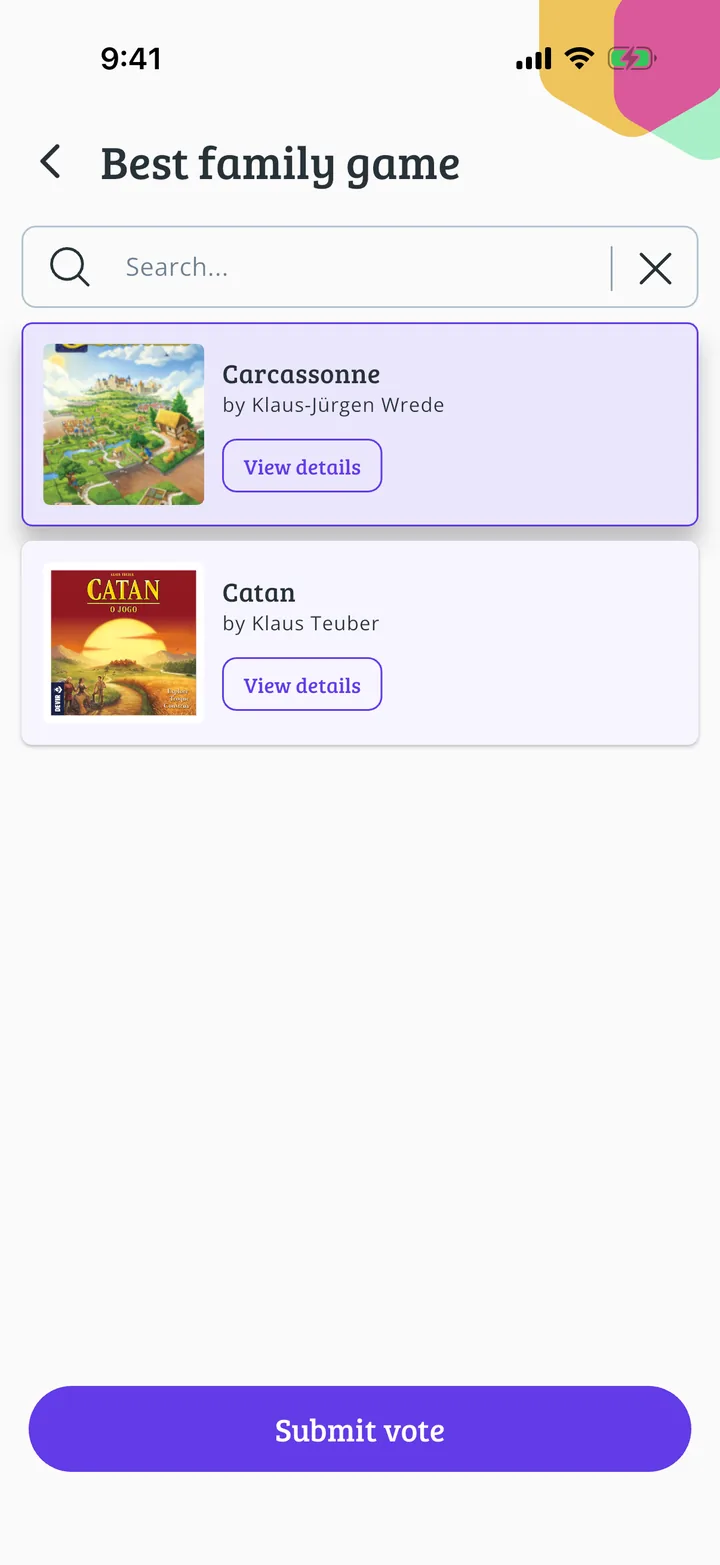
Choose your favourite
Tap the game you want to vote for. View details opens its information.
- Step 5 of 6
Send your vote
Tap Submit vote.
- Step 6 of 6
Vote registered
Tap Accept. You can come back and change your vote while voting is still open.
Guide completed
All done!
You have finished the guide. If something did not go as in the screenshots, tell us which step you got stuck on and we will help you.
Next in «For players»How to complete a Meeplay challenge →