How to join a Meeplay
Find a Meeplay, open its page and sign up. If you're going with someone who has no account, you can also reserve their place.
6 steps with screenshots of the app
Joining a Meeplay reserves your place and gives you access to its chat and your registration. This guide finds a Meeplay by name and joins it. If the Meeplay requires the organizer to accept each person, your request stays pending until they review it.
- Have the Meeplay app installed and be logged in to your account.
In each screenshot, what you need to tap is outlined in yellow and pointed out with an arrow.
- Step 1 of 6
Open Meeplays
On the home screen, tap Meeplays.
- Step 2 of 6
Find one you like
Here are the Next Meeplays. If you already know which one you want, tap the magnifying glass.
- Step 3 of 6
Choose the Meeplay
Type the name and press the search key on the keyboard. Tap the Meeplay in the results.
- Step 4 of 6
Join
The page shows the date, description, participants and games. At the bottom you can see the registration terms and the places left. Tap Join.
- Step 5 of 6
Say how many of you are going
If you're going with someone who has no account, tap Add a player. If not, tap Join.
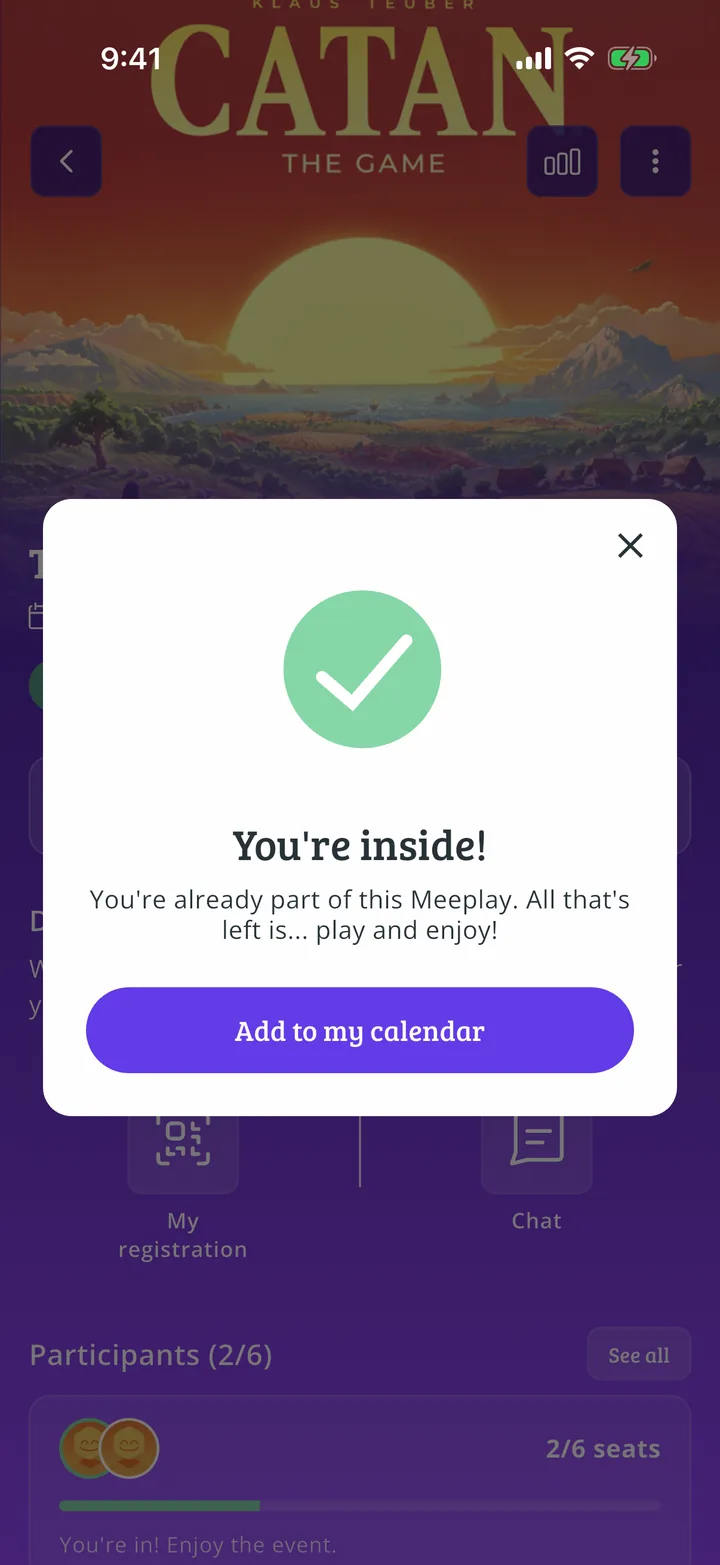
- Step 6 of 6
You're in!
You can add it to your calendar or close the notice with the X. The page now shows My registration and the chat.
All done!
You have finished the guide. If something did not go as in the screenshots, tell us which step you got stuck on and we will help you.
Next in «For players»How to join a Meeplay's waiting list →