I'm a member: how to join my club's Meeplays
Find your club in the app, check that you're a member and join its Meeplays, including members-only ones.
6 steps with screenshots of the app
If you're a member of a club, you can join the Meeplays it reserves for its members. This guide opens the club's profile, checks your membership and signs you up for one of them.
- Have the Meeplay app installed and be logged in to your account.
- Be a member of the club. If you aren't yet, tap I want to be a member on its profile.
In each screenshot, what you need to tap is outlined in yellow and pointed out with an arrow.
- Step 1 of 6
Open organizers
On the home screen, tap Organizers.
- Step 2 of 6
Find your club
Tap the search box, type its name and press the search key on the keyboard. Tap your club in the results.
- Step 3 of 6
Check that you're a member
Its profile shows You're already a member. Tap it to see the details.
- Step 4 of 6
Your membership
Here you can see how long you've been a member and that You have access to members-only Meeplays. Close this window.
- Step 5 of 6
Sign up
Under Meeplays on your club's profile, tap the one you're interested in. On its page, tap Join. People who aren't members can't join the reserved ones.
- Step 6 of 6
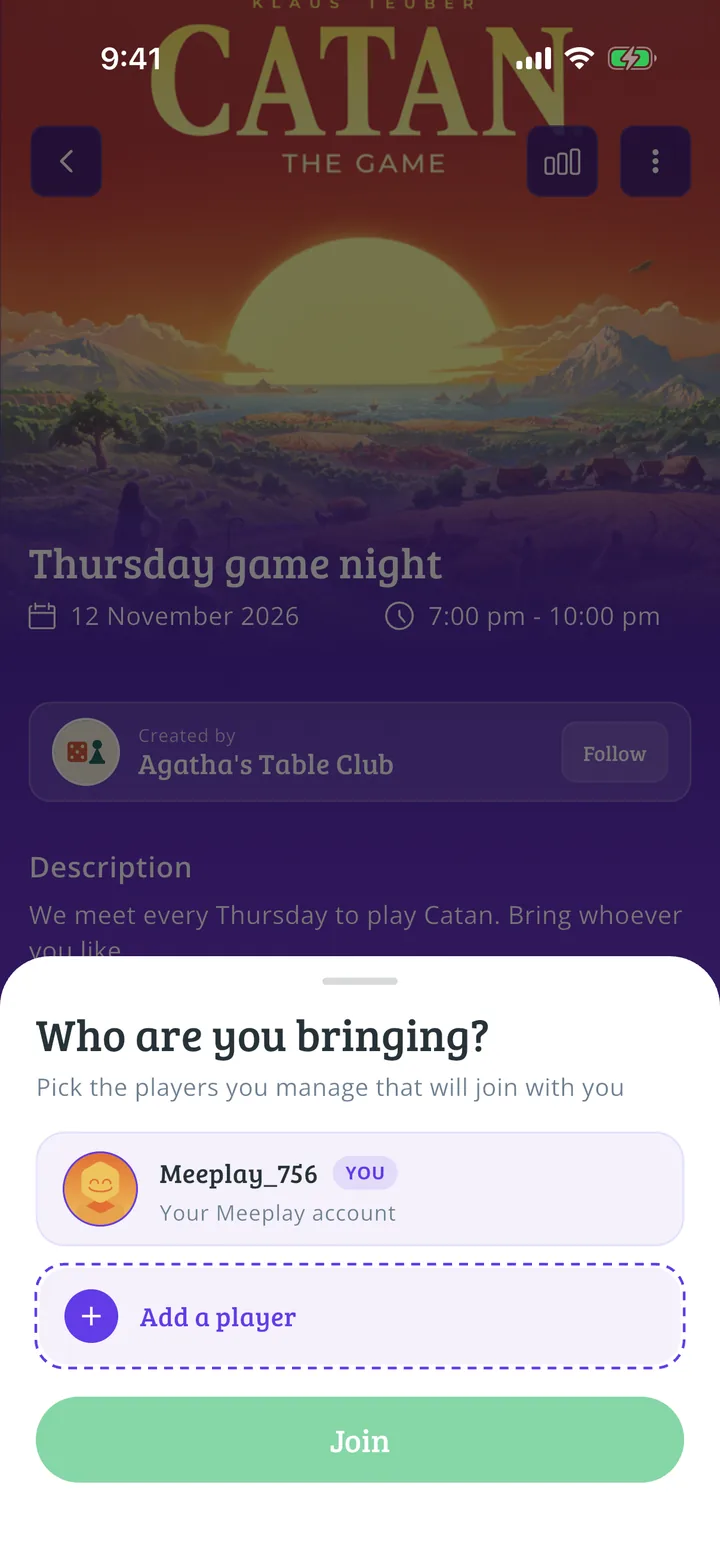
Confirm
If you're going with someone, add their place. Tap Join. Your place is now reserved.
All done!
You have finished the guide. If something did not go as in the screenshots, tell us which step you got stuck on and we will help you.