How to edit a logged game
Fix the scores, players, game or date of a game you already logged, from your list of games.
6 steps with screenshots of the app
If you made a mistake when logging a game, there is no need to delete it: you fix it from your list of games, with the same form you logged it with. This guide fixes one player's score.
- Have the Meeplay app installed and be logged in to your account.
- Have logged the game: see How to log a game.
In each screenshot, what you need to tap is outlined in yellow and pointed out with an arrow.
- Step 1 of 6
Open your stats
Tap the bars button on the bottom bar.
- Step 2 of 6
Go to your games
Tap Logged plays.
- Step 3 of 6
Find the game
They are sorted by date. Tap the three dots button of the game you want to fix.
- Step 4 of 6
Choose "Edit"
Tap Edit. From here you can also Repeat the game (log another one just like it) or Delete it.
- Step 5 of 6
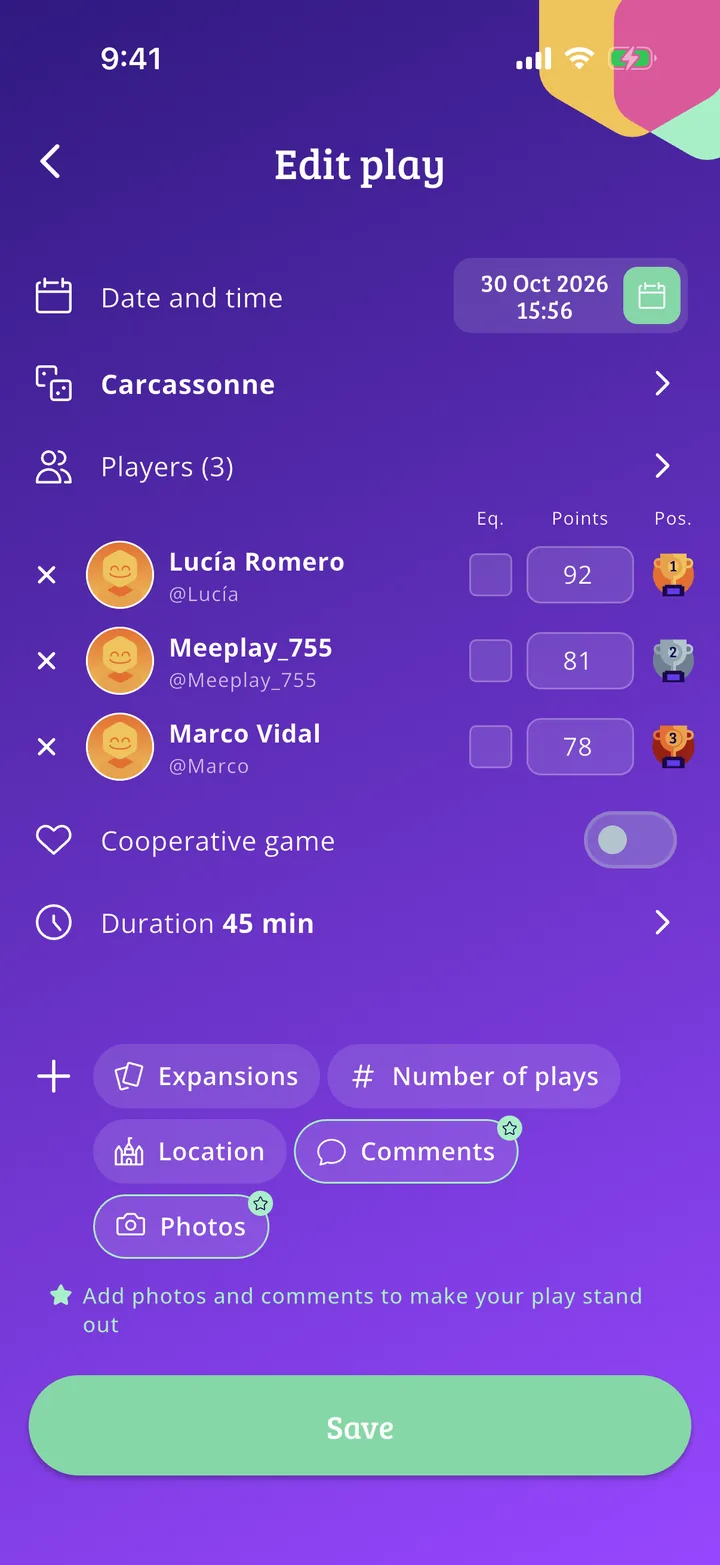
Fix it and save
Change whatever you need (here, one player's score; the places are recalculated on their own) and tap Save.
- Step 6 of 6
Game fixed
Tap Done. The changes already count in your stats and in the other players'.
All done!
You have finished the guide. If something did not go as in the screenshots, tell us which step you got stuck on and we will help you.