Help · Games and collection
How to change a game's name or cover
Give a game the name or image you prefer: only you see the change.
Before you start
5 steps with screenshots of the app
Do you have an edition with a different name or cover? Change them in your app without affecting anyone else.
- Have the Meeplay app installed and be logged in to your account.
In each screenshot, what you need to tap is outlined in yellow and pointed out with an arrow.
- Step 1 of 5
Open search
On the home screen, tap the magnifying glass at the top.
- Step 2 of 5
Search for the game
Type the name, choose the Games tab and tap the game.
- Step 3 of 5
Open the menu
Tap the three dots at the top right.
- Step 4 of 5
Choose the option
Tap Edit name or cover.
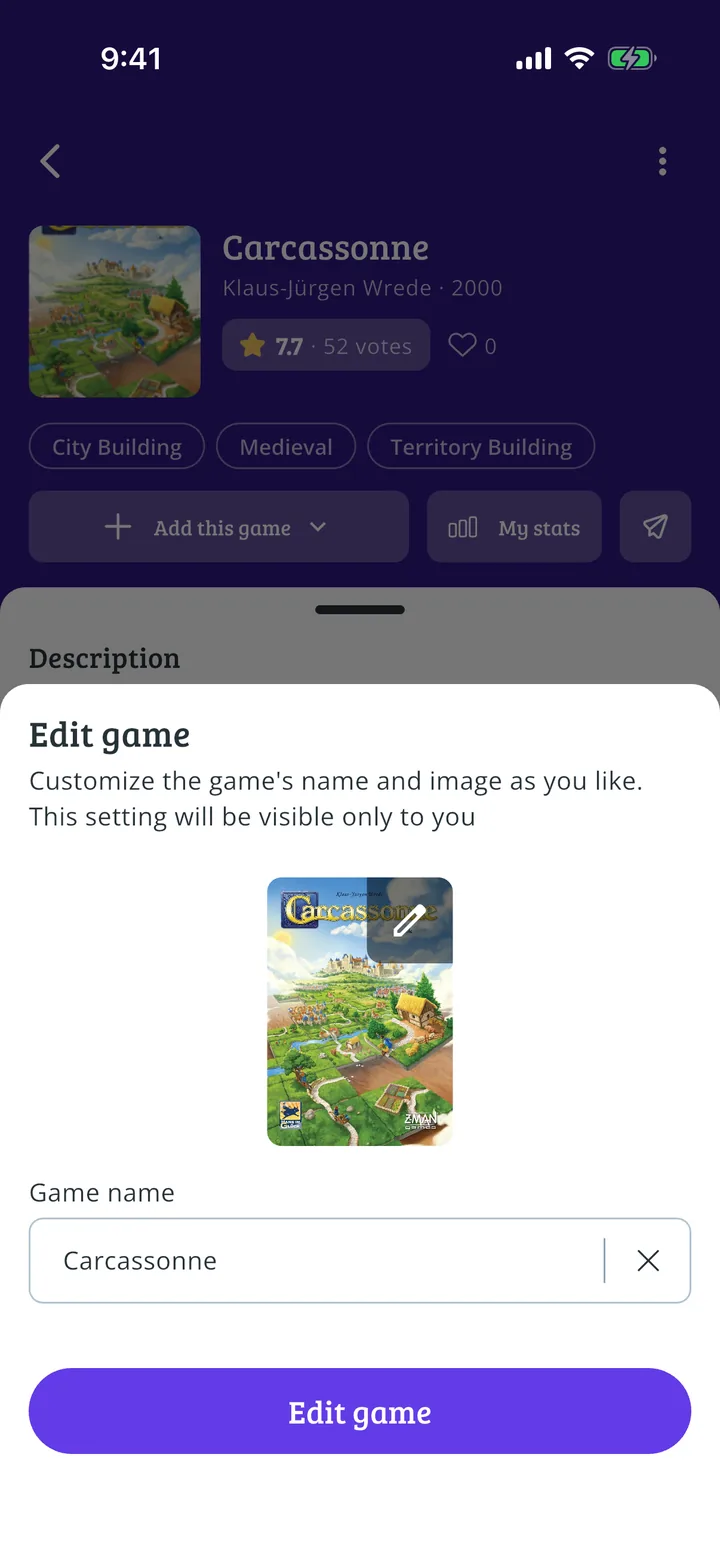
- Step 5 of 5
Change what you want
Customize the game's name and image as you like. This setting will be visible only to you. Tap the image or type another name and press Edit game.
Guide completed
All done!
You have finished the guide. If something did not go as in the screenshots, tell us which step you got stuck on and we will help you.
Next in «For players»How to find a specific game or Meeplay →