How to create your games mosaic
Make an image with the covers of the games you played in a period, give it a title and share it on social media.
5 steps with screenshots of the app
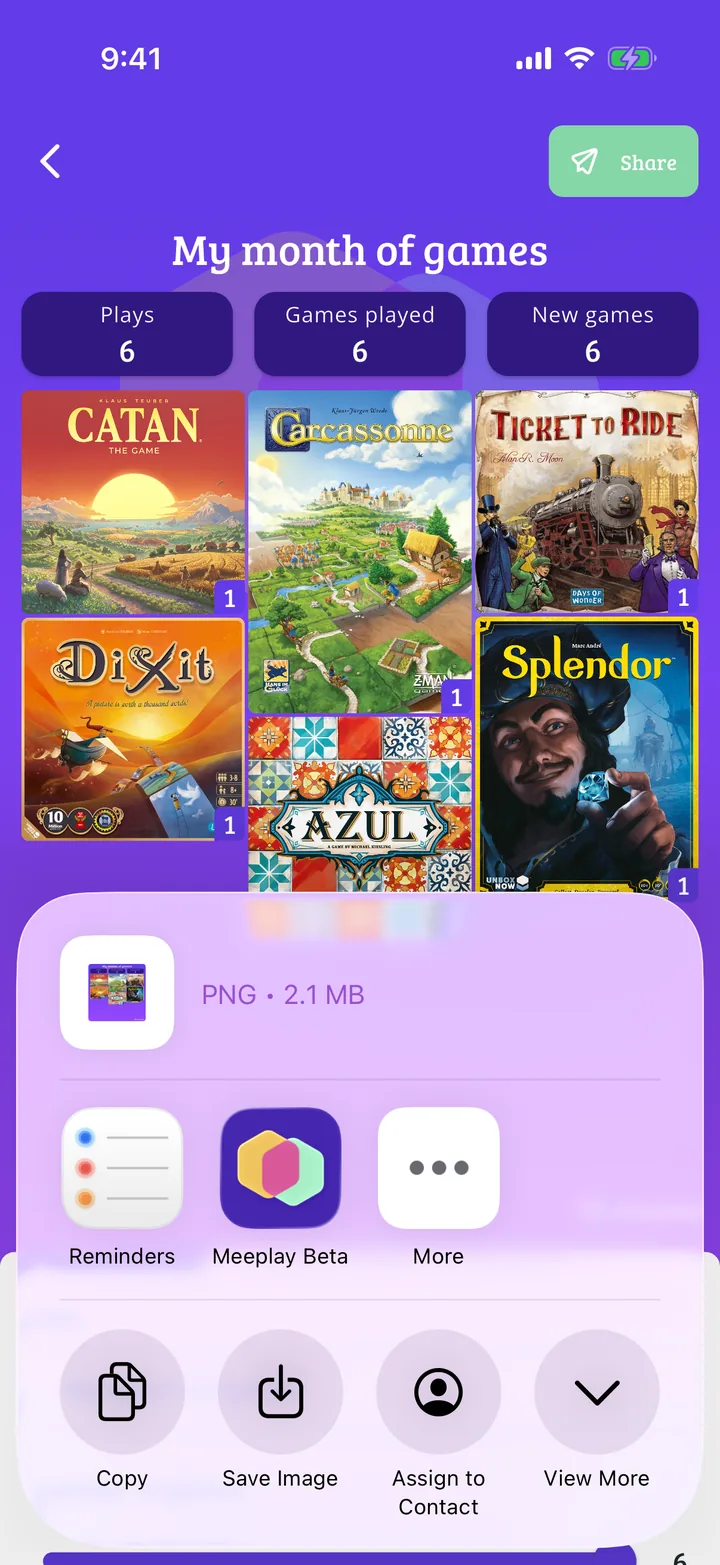
The mosaic brings together in one image the covers of the games you played in a period, with how many plays you have. It is the quick way to show your month or year of gaming on social media.
- Have the Meeplay app installed and be logged in to your account.
- Have games logged in the period you want to show: see How to log a game.
In each screenshot, what you need to tap is outlined in yellow and pointed out with an arrow.
- Step 1 of 5
Open your stats
Tap the bars button on the bottom bar.
- Step 2 of 5
Choose the period
At the top you choose the period: All, This Month, Last Month, This Year or a Custom one. Then tap Share games.
- Step 3 of 5
Choose how it looks
At the top you have the preview, with your plays, the different games and the New games. Under View type you choose Mosaic, Square or List.
- Step 4 of 5
Give it a title and share it
Type a title under Title (it appears at the top of the image) and tap Share.
- Step 5 of 5
Choose where to post it
Your phone's share menu opens: choose the app (Instagram, WhatsApp…) or save the image.
All done!
You have finished the guide. If something did not go as in the screenshots, tell us which step you got stuck on and we will help you.
Next in «For players»How to create your gamer radar →