How to contact a game's seller or buyer
Open a market listing, message the seller from the chat and find all your conversations in the mailbox.
6 steps with screenshots of the app
Each market listing has its own chat, so you can ask about the game and agree on the price and handover. This guide messages the seller of a game. If you're the one selling, messages reach the same mailbox.
- Have the Meeplay app installed and be logged in to your account.
In each screenshot, what you need to tap is outlined in yellow and pointed out with an arrow.
- Step 1 of 6
Find the game
In Circular market, the cart on the bottom bar, tap the search box and type the game's name. Press the search key on the keyboard.
- Step 2 of 6
Open the listing
Tap the listing you're interested in.
- Step 3 of 6
Open the chat
The page shows the price, description, seller and condition. Tap Chat.
- Step 4 of 6
Write your message
Type your question and tap the send button.
- Step 5 of 6
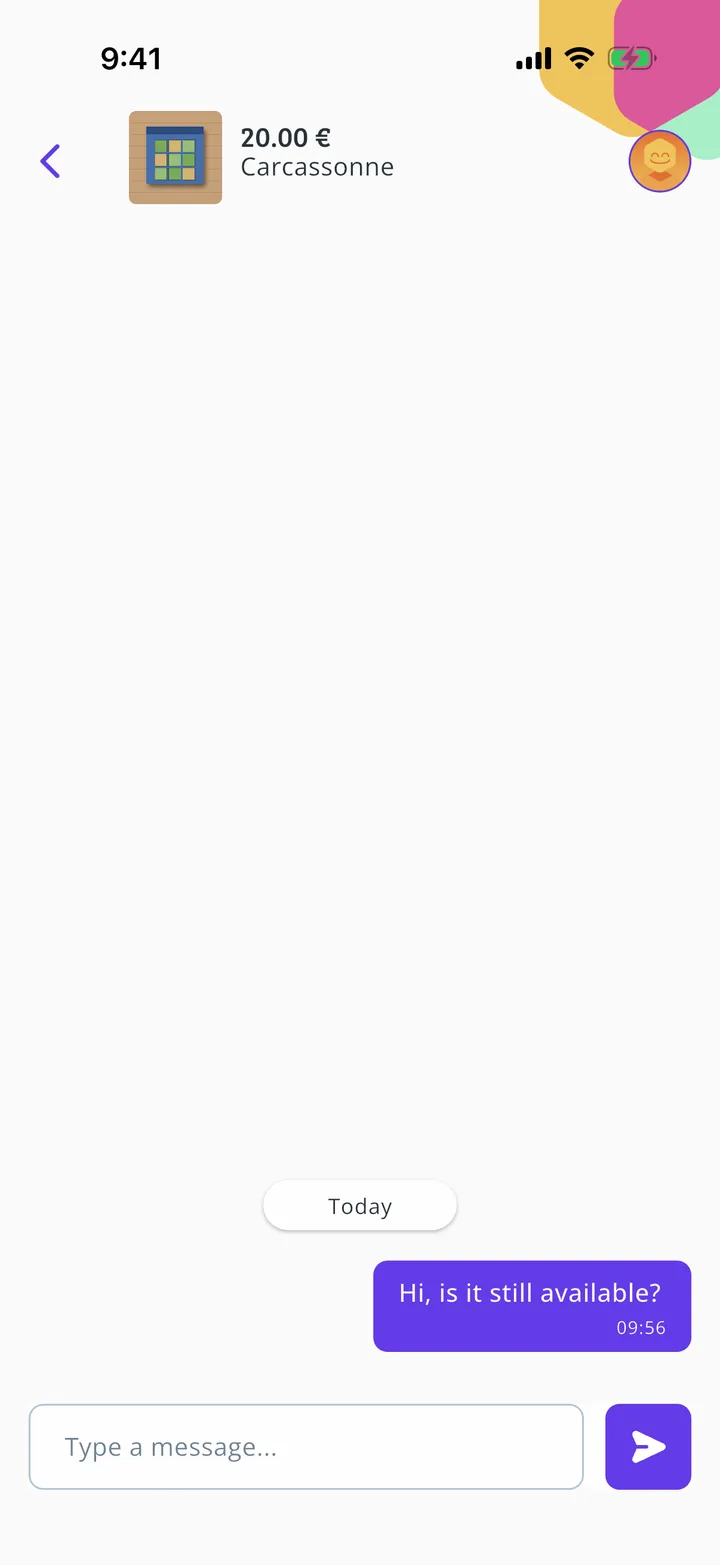
Message sent
Your message stays in the conversation. At the top you can always see which listing you're talking about.
- Step 6 of 6
Find your conversations
To return to a chat, tap the envelope at the top of Circular market. All the conversations about your purchases and sales are there.
All done!
You have finished the guide. If something did not go as in the screenshots, tell us which step you got stuck on and we will help you.