How to rate someone who sold you a game
When a sale is completed, leave your rating and a comment to help the community.
6 steps with screenshots of the app
Ratings help people know who to trust. When someone marks a sale with you, you can rate the experience from the chat.
- Have the Meeplay app installed and be logged in to your account.
In each screenshot, what you need to tap is outlined in yellow and pointed out with an arrow.
- Step 1 of 6
Open your messages
In the market, tap the envelope at the top.
- Step 2 of 6
Open the chat
Tap the conversation about the game you bought.
- Step 3 of 6
Tap "Rate"
When the sale is completed, the chat invites you to rate it. Tap Rate.
- Step 4 of 6
Give your rating
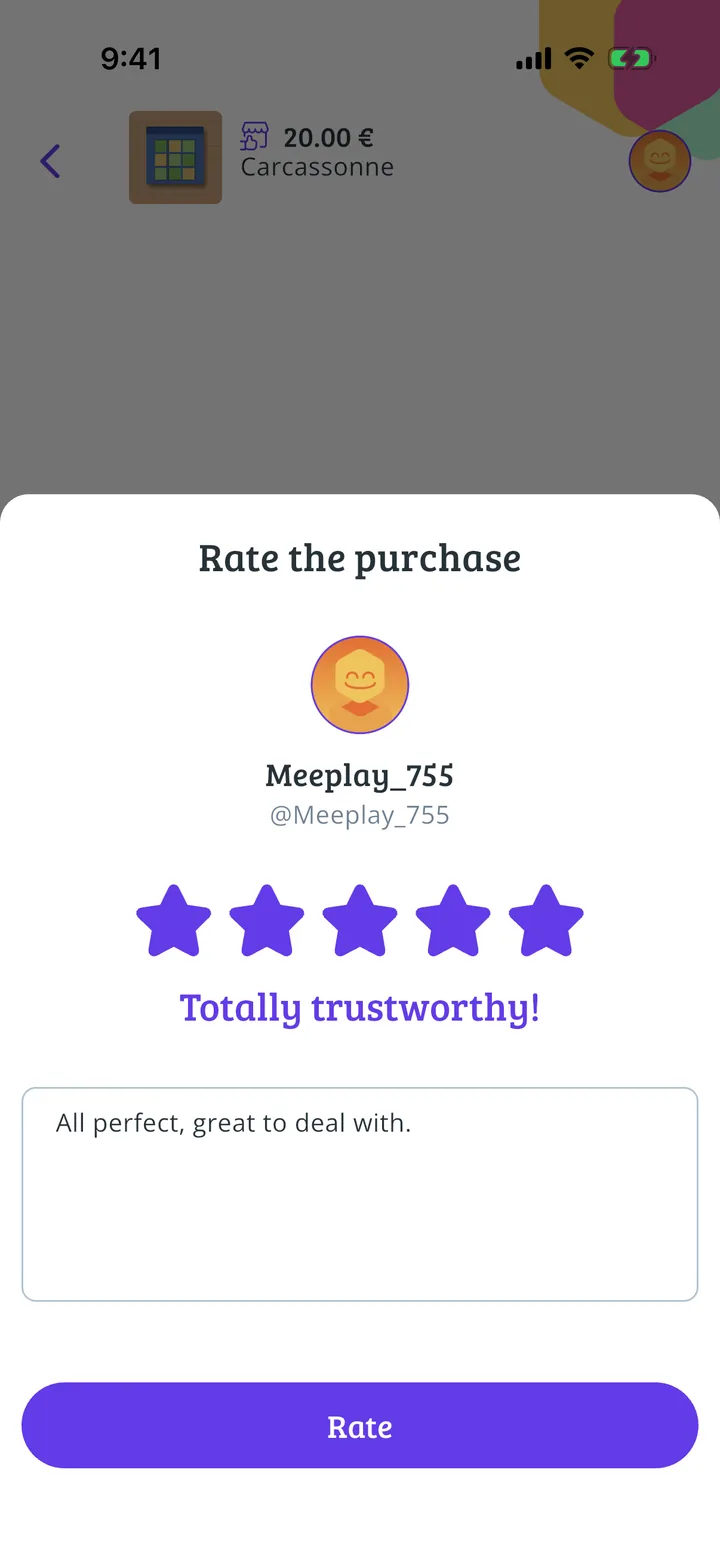
Tap the stars: from Won't buy again to Totally trustworthy!.
- Step 5 of 6
Say how it went
Write your comment and tap Rate.
- Step 6 of 6
Rating sent
Thank you for your feedback. Users will appreciate your comments. Tap Done.
All done!
You have finished the guide. If something did not go as in the screenshots, tell us which step you got stuck on and we will help you.
Next in «For players»How to create a post on Meeplay →