New releases calendar: upcoming game launches
See which games come out each month, filter by country or publisher and ask to be told when they launch.
5 steps with screenshots of the app
On Meeplay you can follow board game launches: what comes out each month, from which publisher and at what approximate price. If one interests you, ask to be notified.
- Have the Meeplay app installed and be logged in to your account.
In each screenshot, what you need to tap is outlined in yellow and pointed out with an arrow.
- Step 1 of 5
Go to "Discover"
On the home screen, tap Discover.
- Step 2 of 5
Open the new releases
Under New, tap See all.
- Step 3 of 5
Check the calendar
The closest launches are at the top, with the monthly list below. The bell notifies you of the launch and the heart shows that you are interested. To filter, tap the funnel at the top.
- Step 4 of 5
Filter what interests you
Choose the month, the Country or the publisher, or turn on Only what interests me. Tap Apply.
- Step 5 of 5
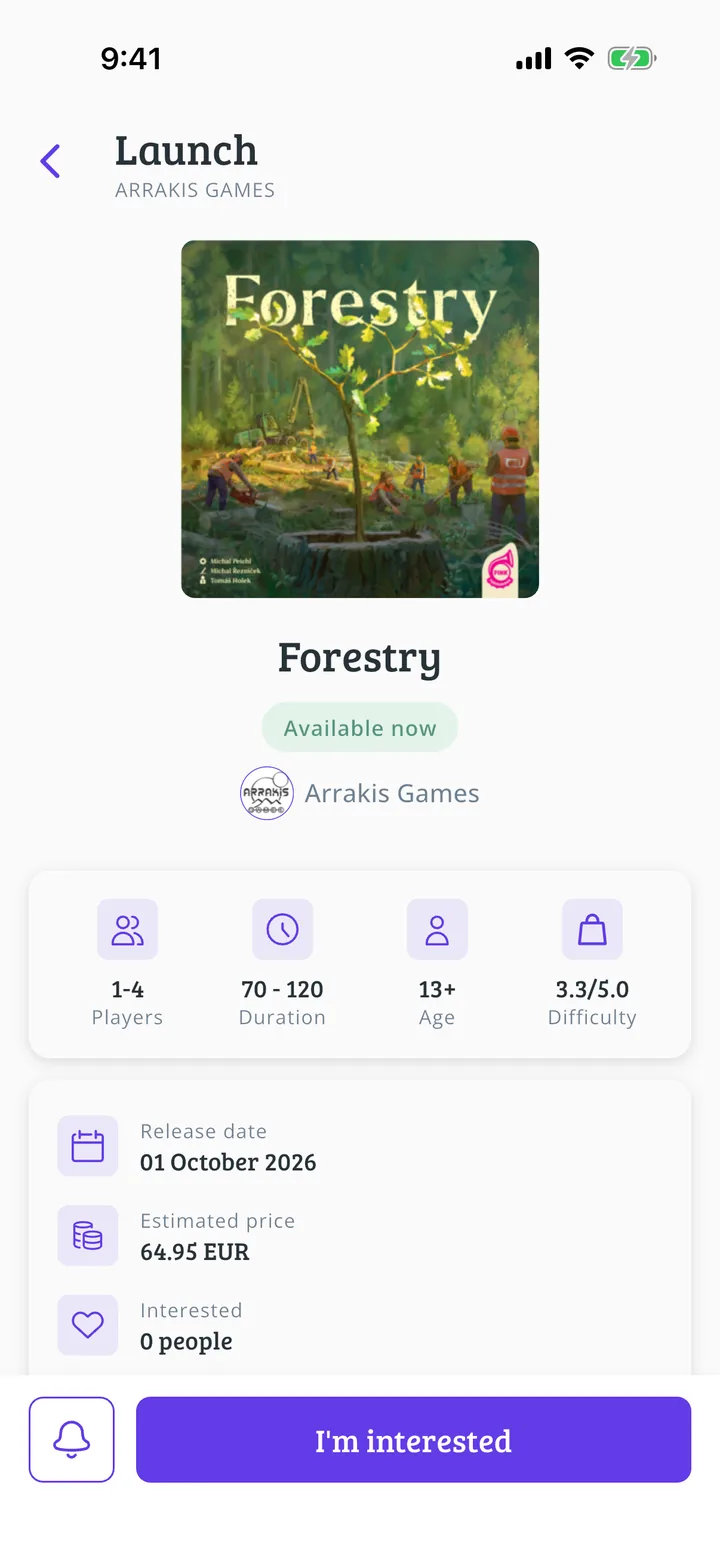
Open a launch
Tap a game on the list to see its Release date and Estimated price. The bell notifies you on launch day and I'm interested saves it among the ones you are interested in.
All done!
You have finished the guide. If something did not go as in the screenshots, tell us which step you got stuck on and we will help you.
Next in «For players»How to find players near me →