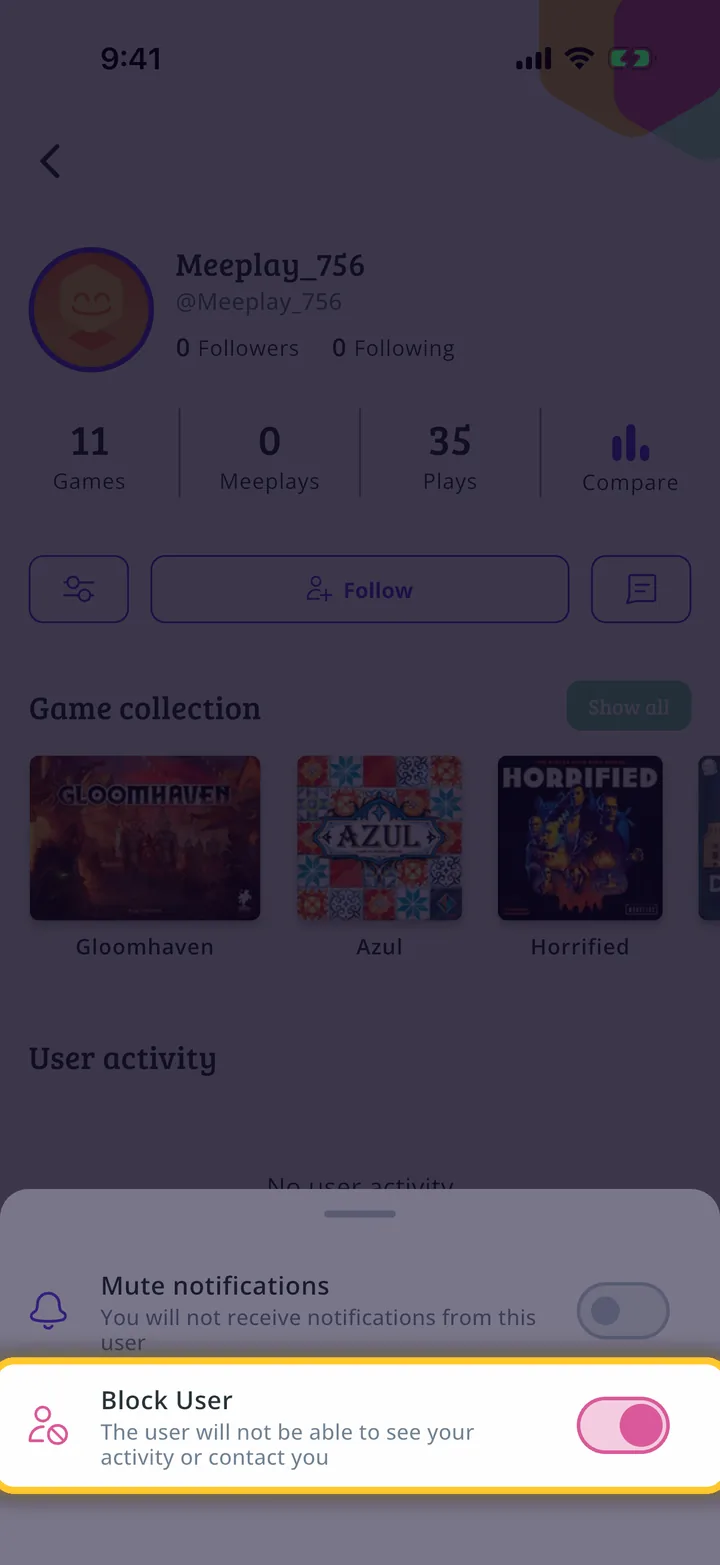
If someone is bothering you, you have two options from their profile: stop receiving their notifications or block them completely.
Have the Meeplay app installed and be logged in to your account.
In each screenshot, what you need to tap is outlined in yellow and pointed out with an arrow.
Step 1 of 5
Open search
On the home screen, tap the magnifying glass at the top.
Step 2 of 5
Search for the person
Type their name or nickname and, under Users, tap them.
Step 3 of 5
Open the options
On their profile, tap the settings button, to the left of Follow.
Step 4 of 5
Mute or block
Mute notifications stops telling you about that person. Block User stops them from seeing your activity and contacting you. Turn on whichever you want.
Step 5 of 5
Done
It applies straight away, with no further steps. To undo it, come back to this same switch.
Guide completed
All done!
You have finished the guide. If something did not go as in the screenshots, tell us which step you got stuck on and we will help you.